Introduction
Defined and documented by the World Wide Consortium (W3C), the XPath specification cannot be changed. The XPath Data Provider publishes one packet of data to the DMS DataStore per XML packet (file).
Sequence Tokens
The XPath Data Provider supports the use of "Sequence Tokens." When an XPath includes this token, the provider makes auto-incremented sequence calls as it processes XML data.
-
Part
- XPath: Document/Samples/Sample[*]/Header/Part
- Data Type: Text
-
Process
- XPath: Document/Samples/Sample[*]/Header/Process
- Data Type: Text
-
Job
- XPath: Document/Samples/Sample[*]/Header/Job
- Data Type: Text
-
Lot
- XPath: Document/Samples/Sample[*]/Header/Lot
- Data Type: Text
-
Value
- XPath: Document/Samples/Sample[*]/Values/Value
- Data Type: Numeric
Using the XML data above, the XPath Data Provider processing takes place as follows.
Process the DMS Item’s XPath Definition
- Locate the first node including a Sequence Token.
- Count the number child elements under that element.
- Acquire the first element’s data elements (one or more).
- Otherwise, if it has no sequence token, acquire the data elements (one item or multiples).
The above functionality would allow only one set of XPath queries in the XPath Data Provider configuration. The query would find the child nodes of each record first and step though them while keeping the header tags static. It would then move to the next record once all child node values are published.
This also would allow for one set of DMS tags allowing for a single DCS configuration (rather than one per potential record).
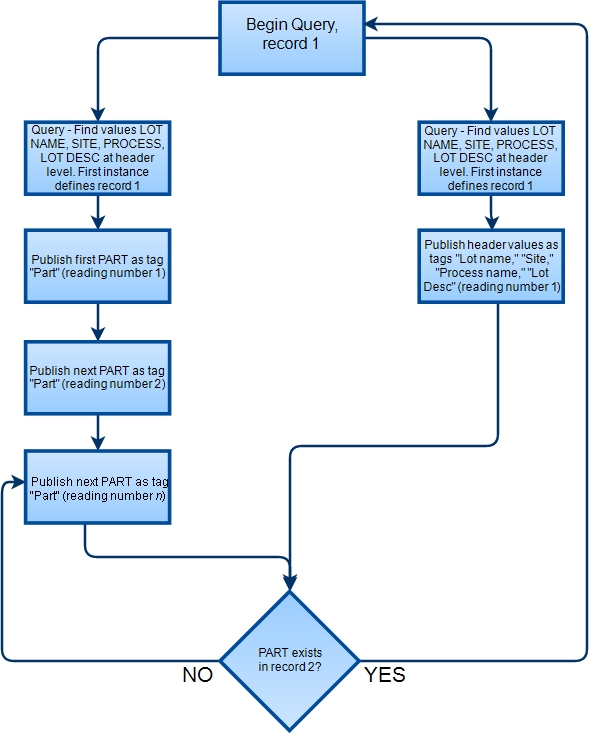
XML File Sample
<Records>
<LOT>000001834309</LOT>
<SITE>1005</SITE>
<PROCESS>217</PROCESS>
<VALUE1>000000000000951207</VALUE1>
<LOTDESC>5.0 BUB FCB FNT MAN/P/L</LOTDESC>
<BOM_COMP>
<PART>000000000017992726</PART>
<PART>000000000017002738</PART>
</BOM_COMP>
</Records>
<Records>
<LOT>000001834339</LOT>
<SITE>1005</SITE>
<PROCESS>213</PROCESS>
<VALUE1>000000000000955732</VALUE1>
<LOTDESC>600 PET X23</LOTDESC>
<BOM_COMP>
<PART>000000000017002344</PART>
<PART>000000000017002310</PART>
<PART>000000000017002381</PART>
</BOM_COMP>
</Records>
DMS Publish Output
|
Site |
Process |
Lot |
Description |
Part |
Record Number |
Reading Number |
|---|---|---|---|---|---|---|
| 1005 | 217 | 1834309 | 5.0 BUB FCB FNT MAN/P/L | 17992726 | 1 | 1 |
| 1005 | 217 | 1834309 | 5.0 BUB FCB FNT MAN/P/L | 17002738 | 1 | 2 |
| 1005 | 217 | 1834339 | 600 PET X23 | 17002344 | 2 | 3 |
| 1005 | 217 | 1834339 | 600 PET X23 | 17002310 | 2 | 4 |
| 1005 | 217 | 1834339 | 600 PET X23 | 17002381 | 2 | 5 |
Base Path Data Field
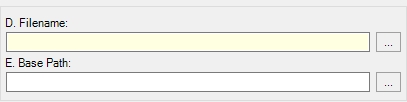
Using the optional Base Path data field, you can set the XML node division, generating a Node List of smaller XML packets, and then invoke an XPath Query for each DMS Item and load all values into a collection. Once loaded, the XPath Data Provider publishes and then removes each value in the collection sequentially, and then loads the next collection, repeating the process.
XML File Sample
<Records>
<LOT>000001834309</LOT>
<SITE>1005</SITE>
<PROCESS>217</PROCESS>
<VALUE1>000000000000951207</VALUE1>
<LOTDESC>5.0 BUB FCB FNT MAN/P/L</LOTDESC>
<BOM_COMP>
<PART>000000000017992726</PART>
<PART>000000000017002738</PART>
</BOM_COMP>
</Records>
<Records>
<LOT>000001834339</LOT>
<SITE>1005</SITE>
<PROCESS>213</PROCESS>
<VALUE1>000000000000955732</VALUE1>
<LOTDESC>600 PET X23</LOTDESC>
<BOM_COMP>
<PART>000000000017002344</PART>
<PART>000000000017002310</PART>
<PART>000000000017002381</PART>
</BOM_COMP>
</Records>
Base Path Example
If you set the Base Path data field to Document/Records, the XPath Data Provider publishes as follows:
-
Lot: 000001834309
- First Part: 000000000017992726
- Second Part: 000000000017002738
-
Lot: 000001834339
- First Part: 000000000017002344
- Second Part: 000000000017002310
- Third Part: 000000000017002381
XPath Examples
Example 1: Single Sample
Consider the following XML packet:
<Document>
<Sample>
<Value>25.8</Value>
<Value>25.4</Value>
<Value>25.2</Value>
<Value>25.5</Value>
<Value>25.7</Value>
</Sample>
</Document>
You must configure the XPath Data Provider to create 5 DMS Items, named Value1, Value2, Value3, Value4, and Value5.
-
Value1
- XPath: Document/Sample/Value[1]
- Data Type: Numeric
-
Value2
- XPath: Document/Sample/Value[2]
- Data Type: Numeric
-
Value3
- XPath: Document/Sample/Value[3]
- Data Type: Numeric
-
Value4
- XPath: Document/Sample/Value[4]
- Data Type: Numeric
-
Value5
- XPath: Document/Sample/Value[5]
- Data Type: Numeric
After processing the first XML file, the XPath Data Provider publishes the following:
- Value1: 25.8
- Value2: 25.4
- Value3: 25.2
- Value4: 25.5
- Value5: 25.7
The XPath Data Provider expects 5 <Value> nodes. If this is not the case, the provider behaves as follows:
- Extra <Value> Nodes. XPath Data Provider consumes the first five nodes and ignores the rest.
- Fewer <Value> Nodes. XPath Data Provider consumes the available nodes, leaving the remaining DMS item values unchanged.
- <Value> Nodes Empty. For numeric items, XPath Data Provider publishes 0 (zero). For text items, XPath XPath Data Provider publishes a blank string value. For date items, XPath Data Provider publishes 1/1/1970 00:00:00 AM.
- <Sample> Nodes Nonexistent. XPath Data Provider publishes nothing.
- Multiple <Sample> Nodes Exist. XPath Data Provider publishes the first set of values, and then on the next publish interval, publishes the next set of values.
Functioning similarly to the Process SQL feature of the Database Provider, the XPath Data Provider queries the contents of an existing XML file, invoking every DMS Item XPath command, which may return single or multiple values. The XPath Data Provider combines the results into fields and records, and publishes the records in order. When finished, the provider processes the next available XML file.
Example 2: Multiple Samples
Consider the following XML packet, which contains two samples:
<Document>
<Sample>
<Value>25.8</Value>
<Value>25.4</Value>
<Value>25.2</Value>
<Value>25.5</Value>
<Value>25.7</Value>
</Sample>
<Sample>
<Value>26.8</Value>
<Value>26.4</Value>
<Value>26.2</Value>
<Value>26.5</Value>
<Value>26.7</Value>
</Sample>
</Document>
The XML Data Provider would now publish 10 values, one per processing interval, as follows:
-
Publishing Interval 1
- Value1: 25.8
- Value2: 25.4
- Value3: 25.2
- Value4: 25.5
- Value5: 25.7
-
Publishing Interval 2
- Value1: 26.8
- Value2: 26.4
- Value3: 26.2
- Value4: 26.5
- Value5: 26.7
To return the five values of the first sample only, you would use the XPath definition Document/Sample[1]/Value. To return the last sample's values, you would use the XPath definition Document/Sample[last()]/Value.
For more information on XPath query options, please see http://www.w3.org/TR/xpath/.
Example 3: Samples with Header
Consider the following XML packet, which contains two samples and a header block, which applies to all samples:
<Document>
<Header>
<Part>Blue Part</Part>
<Process>Lathe 167</Process>
<Job>JB 2134</Job>
<Lot>F-2</Lot>
</Header>
<Sample>
<Value>25.8</Value>
<Value>25.4</Value>
<Value>25.2</Value>
<Value>25.5</Value>
<Value>25.7</Value>
</Sample>
<Sample>
<Value>26.8</Value>
<Value>26.4</Value>
<Value>26.2</Value>
<Value>26.5</Value>
<Value>26.7</Value>
</Sample>
</Document>
The XML Data Provider would now publish 10 values, one per processing interval, and applies the header section to all samples, as follows:
-
Publishing Interval 1
- Part: Blue Part
- Process: Lathe 167
- Job: JB 2134
- Lot: F-2
- Value1: 25.8
- Value2: 25.4
- Value3: 25.2
- Value4: 25.5
- Value5: 25.7
-
Publishing Interval 2
- Part: Blue Part
- Process: Lathe 167
- Job: JB 2134
- Lot: F-2
- Value1: 26.8
- Value2: 26.4
- Value3: 26.2
- Value4: 26.5
- Value5: 26.7
Example 4: Pivoting Values
Consider the following XML packet:
<Document>
<Header>
<Part>Blue Part</Part>
<Process>Lathe 167</Process>
<Job>JB 2134</Job>
<Lot>F-2</Lot>
</Header>
<Sample>
<Value>25.8</Value>
<Value>25.4</Value>
<Value>25.2</Value>
<Value>25.5</Value>
<Value>25.7</Value>
</Sample>
</Document>
To pivot the test values, replace the Value1 through Value5 DMS items with a single DMS item, Value, and remove the sequence identifier from the XPath definition:
-
Part
- XPath: Document/Header/Part
- Data Type: Text
-
Process
- XPath: Document/Header/Process
- Data Type: Text
-
Job
- XPath: Document/Header/Job
- Data Type: Text
-
Lot
- XPath: Document/Header/Lot
- Data Type: Text
-
Value
- XPath: Document/Sample/Value
- Data Type: Numeric
Without the sequence identifier, the XPath command returns individual values with the header information, as follows:
-
Publishing Interval 1
- Part: Blue Part
- Process: Lathe 167
- Job: JB 2134
- Lot: F-2
- Value: 25.8
-
Publishing Interval 2
- Part: Blue Part
- Process: Lathe 167
- Job: JB 2134
- Lot: F-2
- Value: 25.4
-
Publishing Interval 3
- Part: Blue Part
- Process: Lathe 167
- Job: JB 2134
- Lot: F-2
- Value: 25.2
-
Publishing Interval 4
- Part: Blue Part
- Process: Lathe 167
- Job: JB 2134
- Lot: F-2
- Value: 25.5
-
Publishing Interval 5
- Part: Blue Part
- Process: Lathe 167
- Job: JB 2134
- Lot: F-2
- Value: 25.7
Example 5: Samples with Separate Headers
Consider the following XML packet, which contains two samples, each with its own header block:
<Document>
<Samples>
<Sample>
<Header>
<Part>Blue Part</Part>
<Process>Lathe 167</Process>
<Job>JB 2134</Job>
<Lot>F-2</Lot>
</Header>
<Values>
<Value>25.8</Value>
<Value>25.4</Value>
<Value>25.2</Value>
<Value>25.5</Value>
<Value>25.7</Value>
</Values>
</Sample>
<Sample>
<Header>
<Part>Yellow Part</Part>
<Process>Lathe 225</Process>
<Job>JB 1234</Job>
<Lot>F-4</Lot>
</Header>
<Values>
<Value>26.8</Value>
<Value>26.4</Value>
<Value>26.2</Value>
<Value>26.5</Value>
<Value>26.7</Value>
</Values>
</Sample>
<Samples>
</Document>
The XML Data Provider would now publish 10 values, one per processing interval, applying the unique header section to each sample, as follows:
-
Publishing Interval 1
- Part: Blue Part
- Process: Lathe 167
- Job: JB 2134
- Lot: F-2
- Value1: 25.8
- Value2: 25.4
- Value3: 25.2
- Value4: 25.5
- Value5: 25.7
-
Publishing Interval 2
- Part: Yellow Part
- Process: Lathe 225
- Job: JB 1234
- Lot: F-4
- Value1: 26.8
- Value2: 26.4
- Value3: 26.2
- Value4: 26.5
- Value5: 26.7