Creating Roles
Follow the procedure to create a role.
If you make changes to roles, users in the roles who are currently logged in must perform a force refresh (SHIFT+F5) or log off and log in again to view those changes.
- Select Access Menu and then select Security | Roles.
-
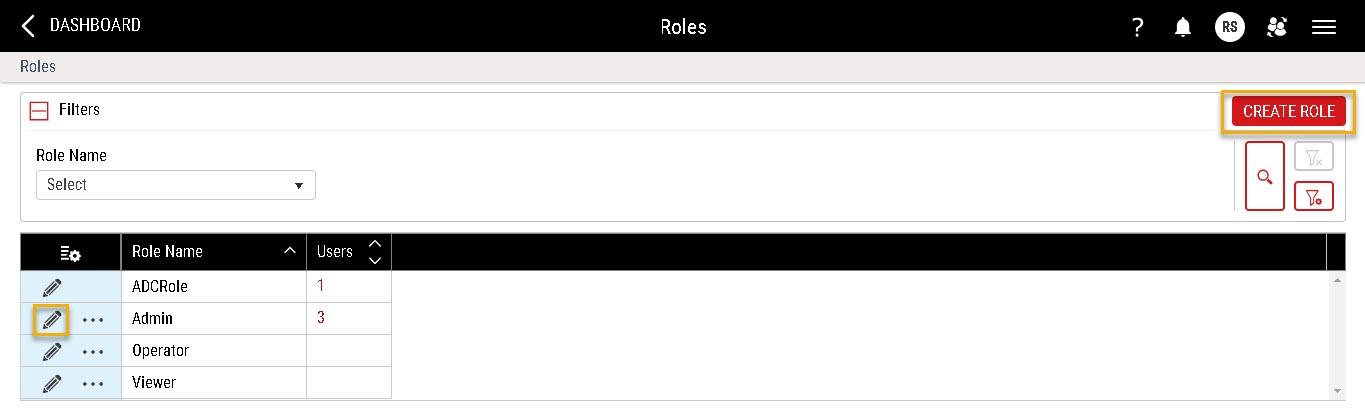
In the Roles landing page, select Create Roles.
-
Modify the contents under the following tabs:
-
 Role Information Tab
Under the Role Information tab, you manage privileges for individual roles, setting what users assigned to those roles can do. Enact organises the list of privileges by keyword (for example, chart, control limit, part, etc.) or action (for example, assign, create, edit, etc.).
- In the Role Name data field, enter the role name.
- In the Long Name data field, enter the extended name of the role.
- (Optional) In the Level data field, assign a level to the role.
- Accepted level values span 1-99, with 1 being the highest level and 99 being the lowest. User and role permissions will be assigned based on the level value you choose. Users will only be able to create, clone or edit roles with levels equal to or lower than the role they are currently assigned.
- Any role not assigned a level will automatically be considered the highest level.
-
In the Permissions section, select the desired display as follows:
-
Keyword Oriented Alignment. To view and set permissions based on application elements (for example, Chart, Condition, Gauge Setup, etc.), select Keyword. For example, to grant a user permissions to manage language labels, you can select Keyword, select Language Label, and then select Manage.

-
Action Oriented Alignment. To view and set permissions based on available functions (for example, Create, Edit, Remove, etc.), select Action. For example, to grant a user permissions to manage language labels, you can select Action, select Manage, and then select Language Label.

List of Available Permissions
-
Access Log
-
Download. Grants permission to view and download access log files.
-
-
All Removed Items
-
Purge. Permanently deletes records marked for deletion in the Data Purge page.
-
-
Application
-
Authentication. Authenticates non-browser items, such as DMS-DCS, Gauge Agent, API connected tools, etc. It works like the workstation authentication, but it is done through a unique browser page which can only be opened via non-browser items that request connectivity to the Enact system.
-
-
Calculation
-
Create. Creates new roles.
-
Edit. Edits existing roles.
-
Remove. Removes existing roles.
-
-
Chart
-
Create. Adds new tiles to existing dashboards.
-
Download. Downloads data from charts.
-
Edit. Edits chart level settings.
-
Manage Control Limit. Displays or hides control limits on control charts.
-
Modify Plot Point. Enables or disables plot points on control charts.
-
Remove. Enables or disables plot points on control charts.
This permission is currently not in use.
-
-
Checklist
-
Collect Data. Open checklists and select checklist entries.
-
Create Configuration. Creates new checklists.
-
Edit Collected Data. Open checklists and edit selected checklist entries.
-
Edit Configuration. Edits existing checklists.
-
Remove Configuration. Removes existing checklists.
-
-
Code Group
-
Create. Creates new code groups.
-
Edit. Edits existing code groups.
-
Remove. Removes existing code groups.
-
-
Code Type
-
Configure. Creates and edits code types.
-
Remove. Removes existing code types.
-
-
Condition
-
Create. Creates new conditions.
-
Edit. Edits existing conditions.
-
Remove. Removes existing conditions.
-
-
Control Limit
-
Bulk Create. Creates new control limits for multiple data streams.
-
Create. Creates new control limits.
-
Edit. Edits existing control limits.
-
Remove. Removes existing control limits.
-
-
Dashboard
-
Create. Creates new dashboards.
-
Download. Displays or hides the Download Raw Data button, which allows you to download data from raw dashboards to Excel spreadsheets.
This permission does not affect downloading contents of individual tiles.
-
Edit. Edits existing dashboards.
-
Remove. Removes existing dashboards.
-
Pin. Pins existing dashboards.
By default, this is unchecked for all users with any roles.
-
-
Data Collection
-
Collect Data. Open data collections and collect data.
-
Create Configuration. Creates new data collections.
To add data collections to process models, you must also have Process Model (Create/Edit).
-
Edit Collected Data. Open data collections and edit collected data.
-
Edit Configuration. Edits existing data collections.
-
Remove Configuration. Removes existing data collections.
To remove data collections from process models, you must also have Process Model (Remove).
-
-
Data Collection Type
-
Create. Creates new data collection type.
-
Edit. Edits existing data collection type.
-
Remove. Removes existing data collection type.
-
- Data Connections
- Manage. Enable aggregated record publishing, allowing you to publish Key Performance Indicators (KPIs) to a destination that you decide (for example, ERP). Users with manage permission can update, create, remove or configure connections and their details (including retry in alerts).
Users without Manage access can only view listed connections and their details, including alerts.
- Manage. Enable aggregated record publishing, allowing you to publish Key Performance Indicators (KPIs) to a destination that you decide (for example, ERP). Users with manage permission can update, create, remove or configure connections and their details (including retry in alerts).
-
Event Code
-
Create. Creates new event codes.
-
Edit. Edits existing event codes.
-
Remove. Removes existing event codes.
-
-
Events
-
Flagged Subgroup Can flag events at the subgroup level to enter comments for any observation. This triggers the 'flagged value' event.
-
-
Feature
-
Create. Creates new features.
-
Edit. Edits existing features.
-
Remove. Removes existing features.
-
-
Gauge Setup
-
Create. Creates new gauge devices, gauge formats\ and gauge interfaces.
-
Edit. Edits existing gauge devices, gauge formats\ and gauge interfaces.
-
Remove. Removes existing gauge devices, gauge formats\ and gauge interfaces.
-
-
Global Configuration
-
Edit. Configures settings across the entire Enact application. For more information, please see Configuring Global Settings.
-
-
Image (Checklist and Event Review)
-
Remove. Remove images attached to events or checklists.
-
-
Language Label
-
Manage. Creates and edits language labels for all elements.
-
-
Licence
-
Assign/Unassign. Assigns or unassigns licences in the Licence Management landing page.
If the role has User Management (Create/Edit) permissions, users within that role will still be able to assign or unassign licences through the Create User or Edit User page.
If the role has Workstation (Edit) permissions, users within that role will still be able to assign or unassign licences through the Edit Workstation page.
- Manage Licence Report. Enables Licence Report link on the Licence Management landing page, allowing users to open the Licence Report.
-
-
Lot
-
Create. Creates new lots.
-
Edit. Edits existing lots.
-
Manage Lot Disposition. Sets lot to Accepted or Rejected.
-
Remove. Removes existing lots.
-
-
Lot Genealogy Assignments
-
Create. Creates new lot genealogy assignments.
-
Edit. Edits existing lot genealogy assignments.
-
Remove. Removes existing lot genealogy assignments.
-
-
Manufacturing Limit
-
Create. Creates new manufacturing limits.
-
Edit. Edits existing manufacturing limits.
-
Remove. Removes existing manufacturing limits.
-
-
-
Download. Downloads data structure, including user and workstation data, which provides more detail on licence allocation.
Import. Imports new items, including parts, features and manufacturing limits.
-
-
Menu Template
-
Create. Creates new menu templates.
-
Edit. Edits existing menu templates.
-
Remove. Removes existing menu templates.
-
-
Notification Rule
-
Create. Creates new notification rules.
-
Edit. Edits existing notification rules.
-
Remove. Removes existing notification rules.
-
-
Parameter Set
-
Create. Creates new parameter sets.
-
Edit. Edits existing parameter sets.
-
Remove. Removes existing parameter sets.
-
-
Part
-
Create. Creates new parts.
-
Create Revision. Creates new part revisions.
-
Edit. Edits existing parts.
-
Release. This permission is not implemented.
Regardless of this permission setting, Enact always disables the Release button on the Create Part and Edit Part pages.
-
Remove. Removes existing parts.
-
-
Part Feature Details
-
Create. Creates new part feature details.
-
Edit. Edits existing part feature details.
-
Remove. Removes existing part feature details.
-
-
Part Recipe
-
Create. Creates new part recipes.
-
Edit. Edits existing part recipes.
-
Remove. Removes existing part recipes.
-
-
Process
-
Create. Creates new processes.
-
Edit. Edits existing processes.
-
Remove. Removes existing processes.
-
-
Process Model
-
Create. Creates new process models.
-
Edit. Edits existing process models.
-
Remove. Removes existing process models.
-
-
Process State
-
Configure Parameters. Creates new process states.
-
Set State. Sets new process states or changes existing process states.
-
-
Processing Template
-
Create. Creates new processing templates.
-
Edit. Edits existing processing templates.
-
Remove. Removes existing processing templates.
-
-
Production Assignment
-
Change. Starts a new production assignment, assigning the selected part and lot to the selected process, from the Process Information tile. This permission is intended for operators.
-
Create. Creates new production assignments from the Production Assignments landing page. This permission is intended for administrators.
Users in this role are automatically given the Start permission.
-
Edit. Edits existing production assignments from the Production Assignments landing page. This permission is intended for administrators.
Users in this role are automatically given the Change permission.
-
Manage Pin.
What is pinning?
When production assignments overlap because the parts or lots have been scheduled for the same time, you can pin an active production assignment from the list of current production assignments. Enact treats the pinned production assignment as the only production assignment for that process. Data collections ignore all other assignments while the pin is active, which means manual data collections will bypass the part. At the same time, lot selection dialog boxes and automated data collections can upload data without requiring a specified part and lot.
Pinning also allows users to assign dashboards to other users, which enables them to have relevant information readily available rather than having to search through all dashboards for the correct one.
-
Remove. Removes existing production assignments from the Production Assignments landing page. This permission is intended for administrators.
-
Start. Modifies an existing production assignment, assigning the selected part and lot to the selected process, from the Process Information tile. This permission is intended for operators.
-
-
Response Group
-
Create. Creates new response groups.
-
Edit. Edits existing response groups.
-
Remove. Removes existing response groups.
-
-
Role Management
-
Create. Creates new roles.
-
Edit. Edits existing roles.
-
Remove. Removes existing roles.
-
-
Rule Template
-
Create. Creates new rule templates.
-
Edit. Edits existing rule templates.
-
Remove. Removes existing rule templates.
-
-
Security Policy
-
Edit. Configures credential settings (usernames and passwords) and user login settings (user activity).
-
-
Shift
-
Change. Starts another shift immediately from the Process Information tile. This permission is intended for operators.
-
Create. Creates new shifts from the Shifts landing page. This permission is intended for administrators.
-
Edit. Edits existing shifts from the Shifts landing page. This permission is intended for administrators.
-
Edit Log. Edits existing shift start times and end times from the Shift Logs landing page. This permission is recommended for supervisors.
Users in this role are automatically given the Change, Extend, Revert and Start permissions.
-
Extend. Extends the end time of the current shift by 30 minutes from the Process Information tile. This permission is intended for operators.
-
Remove. Removes existing shifts from the Shifts landing page. This permission is intended for administrators.
-
Revert. Continues the end time of the previous shift by 30 minutes from the Process Information tile. This permission is intended for operators.
-
Start. Starts shifts early from the Process Information tile. This permission is intended for operators.
-
-
Statistical Rule
-
Create. Creates new statistical rules.
-
Edit. Edits existing statistical rules.
-
Remove. Removes existing statistical rules.
-
-
Subgroup Data
-
Delete (Bulk). Removes subgroup data from the Bulk Delete Subgroup Data page.
Users in this role will still be able to remove subgroups by removing the data structure (for example, processes, parts, features, etc.), and will also still be able to disable subgroups on a control chart.
-
-
Subgroup Label Group
-
Create. Creates new subgroup labels.
-
Edit. Edits existing subgroup labels.
-
Remove. Removes existing subgroup labels.
-
-
Tag Group
-
Create. Creates new tag groups.
-
Edit. Edits existing tag groups.
-
Remove. Removes existing tag groups.
-
-
User Management
-
Activate. Activate inactive users from the Users landing page.
If a user becomes inactive because of the Activation End Date, you can activate that user manually with the Edit permission.
-
Create. Creates new users.
-
Edit. Edits existing users.
Users in this role will not be able to edit Access Level, which is managed with the Edit Access Level permission below.
-
Edit Access Level. Edits Access Level of users.
Users in this role are automatically given the Edit permission.
-
Manage password emails for users with no email. Receives password creation emails for all newly created users without email addresses. Users in this role must have an access level equal to or above the newly created user.
If a user without an email address attempts to authenticate a workstation, Enact handles the request as a remote authentication, notifying users with Remote Authentication permission that have an access level equal to or above the requesting user. For more information, please see Authenticating Workstations.

-
-
Workflow
-
Create. Creates new workflows.
-
Create Assignment. Creates new workflow assignments.
-
Edit. Edits existing workflows.
-
Edit Assignment. Edits existing workflow assignments.
-
Remove. Removes existing workflows.
-
Remove Assignment. Removes existing workflow assignments.
-
-
Workstation
-
Create. Creates new workstations.
-
Edit. Edits existing workstations.
-
Local Authentication. Performs authentication for user's own workstation, who types the emailed authentication code and then selects the workstation's name.
-
Remote Authentication. Performs authentication for another user's workstation via email.
-
-
-
User Tab
Under the Users tab, you can assign users to roles, granting those users specific privileges to functions and elements within Enact. Once assigned a role, that user will only be able to edit roles and users with a level equal to or less than the one currently assigned.
-
Select Assign User to Role.

In the Available User(s) section, Enact displays users that have no assigned roles.
- In the Available User(s) section, select the desired user, and then select Select to assign them to the selected role.
-
-
- Select Save.


