Editing Shifts
Using this procedure, you will edit the existing shift.
- Select Access Menu and then select Process | Shifts.
-
In the Shifts landing page, select Edit.

-
To view the data fields in the language they were originally created, activate the Default Name slider.
To view the data fields in the current user's Preferred Language, deactivate the Default Name slider.
If you do not see the Default Name slider, Enact does not have any language labels in the current user's Preferred Language.
- In the Shift Name data field, type the shift name.
-
In the Process Shift Schedule section, you can configure the desired shift schedules, one per process. For more information, do the following:
-
 Creating Shift Schedules
By creating a shift schedule, you define the days and times during the week when a shift is active. Shift schedules are based on process or site and reflect the time zone for the selected site.
-
In the shift page, select Add & Schedule Process.

-
In the Process Name data field, select Process, select the desired process, and then select Save.
-
In the Effective From data field, select Calendar and select the desired effective date.
You can set the desired date up to one year prior to the current date, allowing you to organize data by shift that was collected in the past.
- In the schedule section, select the checkbox for each day that applies to this shift. To select all days, select the column header checkbox.
-
In each selected day, select Time and select the desired time for Start Time and End Time.
To apply the Start Time and the End Time to all selected days, set one day and then select that day's Apply to All.
- Select Save.
-
-
Editing Shift Schedules
By editing a shift schedule, you change the days and times during the week when a shift is active. Using Effective date, you can set when the changes start.
-
In the shift page, select Edit.
-
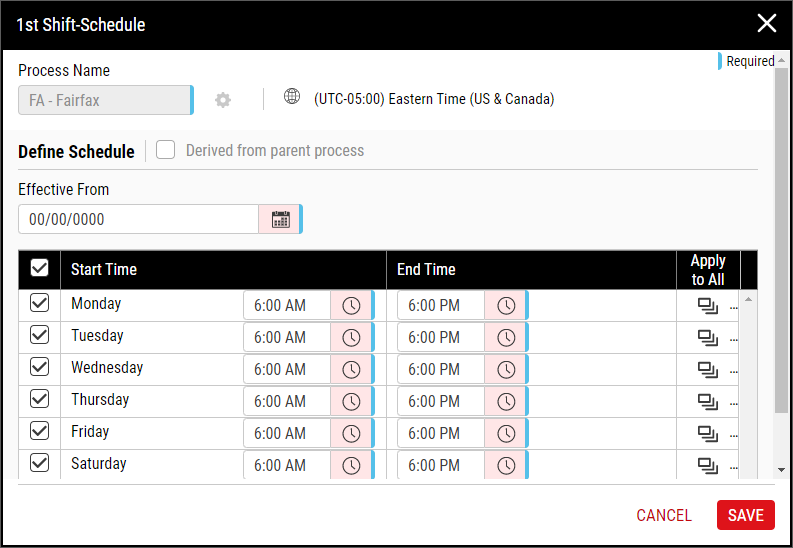
In the Effective From data field, select Calendar and select the desired effective date.
You can set the desired date up to one year prior to the current date, allowing you to organize data by shift that was collected in the past.
- In the schedule section, select the checkbox for each day that applies to this shift. To select all days, select the column header checkbox.
-
In each selected day, select Time and select the desired time for Start Time and End Time.
To apply the Start Time and the End Time to all selected days, set one day and then select that day's Apply to All.
- Select Save.
-
-
- Select Save.


