Viewing Pinned Dashboards
Using this procedure, you can locate and manage the pinned dashboard from dashboards that you created.
-
In the toolbar, select Select Dashboard.

-
In the Select Dashboard dialog box, select View All.

-
Go to the Pinned tab.
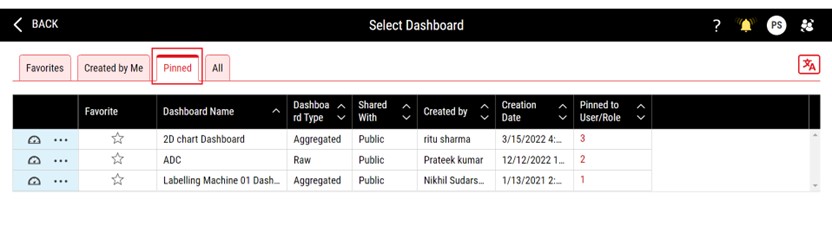
A list of pinned dashboards appears in the grid displaying information such as Favorite, Dashboard Name, Dashboard Type, Shared With, Created By, Creation Date, and Pinned to User/Role.
-
Click the number in the Pinned to User/Role column, to view the list of assignments that are present against that dashboard.
The Pinned to User/Role column displays the number of assignments on a particular dashboard. In case there are no assignees assigned to a dashboard, the column value remains blank.
